AI Virtual Try-On for Fashion Ecommerce: How It Works and Where It Fails
How AI virtual try-on works for fashion ecommerce, where AI models for clothing fail, and how to check images before they go live.

"AI try-on" is being sold to fashion teams as one thing. It is two different products with different goals, and most of the disappointment I see comes from buying one while expecting the other. I'm the CTO at bZm Graphics, where we run a 250-person retouching team and build eTRYon, our own AI try-on tool. This post explains how AI virtual try-on works for fashion ecommerce, what it is good at, and where it still fails.
What AI virtual try-on means in fashion ecommerce
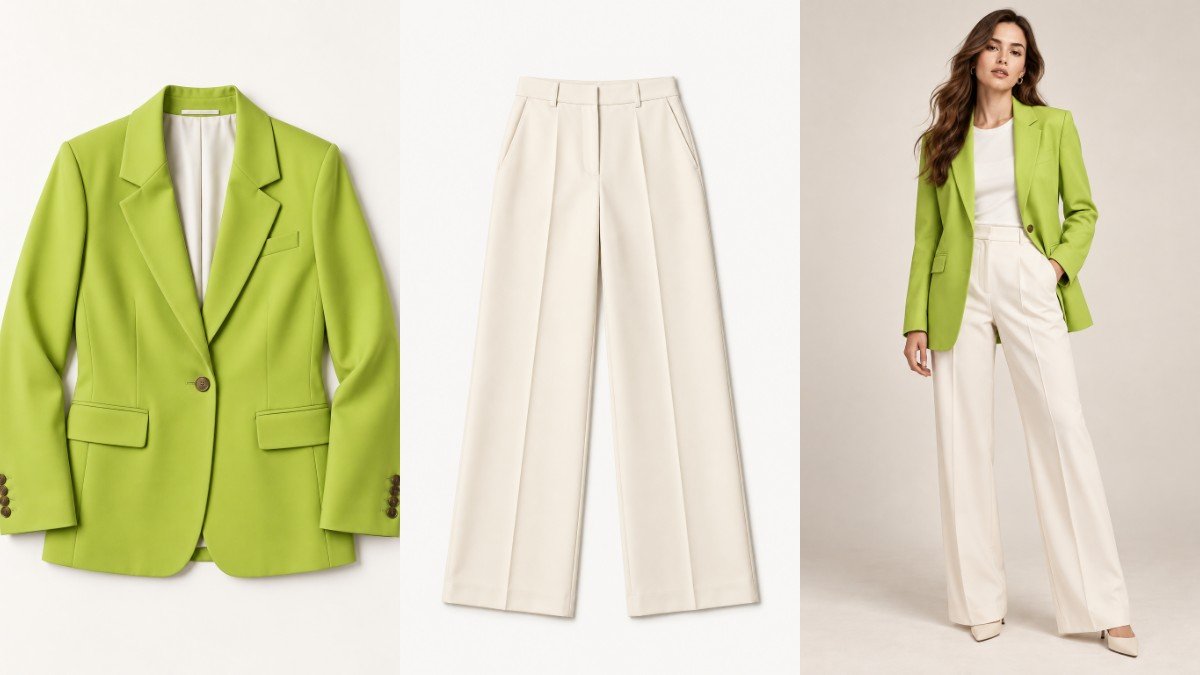
AI virtual try-on uses a generative image model to show a garment on a person without photographing that person wearing it. The model takes a picture of the garment and a picture (or description) of a body, and renders a new image of the two together.
The term covers two separate uses:
| Shopper try-on | Seller try-on (AI models for clothing) | |
|---|---|---|
| Who uses it | The customer, on the product page | The brand or studio, before the product goes live |
| Input | The shopper’s own photo plus your product image | A flat lay, ghost mannequin or on-model photo of the garment |
| Output | A preview of the shopper wearing the item | Product-page and campaign images on a model |
| Goal | Help the shopper decide | Replace or reduce model photoshoots |
| Main risk | The preview looks right but the size is wrong | The image does not match the real garment |
Glasses, hair color and makeup try-on belong to the first group and are a more mature category. Clothing is harder because fabric bends, stretches and hangs differently on every body. The rest of this post is mostly about the second group, because that is the part a fashion brand controls.
How AI model try-on works, step by step
Most current tools, including ours, follow the same broad pipeline:
- •Garment understanding. The system separates the garment from its background and works out its type, shape, seams, print and texture. A clean input matters more here than anywhere else.
- •Body and pose. It needs a target: a real model photo, a generated model, or a pose and body type you choose.
- •Generation. A diffusion model renders the garment onto the body, inventing the folds, shadows and occlusions that the flat product photo never contained.
- •Finishing. Color is checked against the product, artifacts are repaired and the image is cropped and exported to the store’s spec.
Step three is the part that matters for trust. The model is not moving your garment onto a person. It is drawing a new picture that should look like your garment. Everything that goes wrong follows from that.
Three starting points: flat lay, ghost mannequin, or model
In eTRYon we expose three workflows, and they behave differently:
- Flat lay to model. The cheapest input to produce. The AI has to guess the garment’s volume, so it suits simple shapes such as tees, knitwear and casual dresses. See our flat lay clothing photography guide for shooting inputs that work.
- Ghost mannequin to model. A ghost mannequin image already shows the garment in three dimensions, so the result keeps shape and collar structure better. This is the input I recommend for tailored items.
- Model to model. You already have an on-model photo and want a different model, pose or backdrop. The garment is seen as worn, so drape is the most reliable of the three.
On eTRYon the output is delivered at up to 4K and licensed for commercial use, and a typical look takes minutes instead of a shoot day. That speed is real. It is also the reason quality control gets skipped.
Open-source virtual try-on models worth knowing
You do not have to take any vendor’s word for how this works, mine included. The research is public and several models can be downloaded and run. These are the ones I point engineers to first. I am describing the public building blocks here, not the internals of any commercial product.
The first wave: diffusion try-on models (2023 to 2024)
| Model | What is distinctive | License |
|---|---|---|
| StableVITON (CVPR 2024) | A frozen Stable Diffusion 1.5 with a trainable, ControlNet-style encoder, guided by the garment image, a mask and a DensePose map. Now mostly a historical reference, but still a heavily searched name. | CC BY-NC-SA 4.0 (non-commercial) |
| OOTDiffusion (AAAI 2025) | Stable Diffusion 1.5 with a second “outfitting” UNet that carries garment detail into denoising. Influential on later work. | CC BY-NC-SA 4.0 (non-commercial) |
| IDM-VTON (ECCV 2024) | Built on SDXL with two parallel UNets and an IP-Adapter. Known for fabric texture and color accuracy; heavier and slower to run. | CC BY-NC-SA 4.0 (non-commercial) |
| CatVTON (ICLR 2025) | Concatenates the garment and person images and lets self-attention do the work. About 899M parameters, about 50M of them trained, under 8 GB of VRAM at 1024×768. | CC BY-NC-SA 4.0 (non-commercial) |
The newer wave: transformers, mask-free models and LoRAs (2025 to 2026)
| Model | What is distinctive | License |
|---|---|---|
| Leffa (CVPR 2025) | Learns flow fields inside attention to reduce distortion of fine detail, and also does pose transfer. | MIT for code and weights; the training datasets have their own terms |
| FitDiT | A diffusion transformer aimed at fine garment detail. Weights need an access request. | CC BY-NC-SA 4.0 (non-commercial) |
| Any2AnyTryon | Instruction-driven try-on without masks or pose inputs, built for several garment tasks in one model. | See repository |
| OmniTry (NeurIPS 2025) | A LoRA on FLUX.1-Fill-dev that tries on any wearable, including jewelry, bags and hats, with no mask. Needs roughly 28 GB of VRAM. | LoRA is Apache-2.0, but the FLUX.1-Fill-dev base is non-commercial |
| Voost (SIGGRAPH Asia 2025) | One diffusion transformer for both try-on and try-off (recovering the flat garment from a worn photo). | Non-commercial; weights not publicly downloadable |
| FASHN VTON v1.5 (2026) | A mask-free model of about 972M parameters from a commercial try-on vendor, released with open weights. | Apache-2.0, per the vendor |
| Qwen-Image-Edit + a try-on LoRA | Not a try-on model at all: a 20B-parameter general image editor that takes several input images, steered to try-on by community LoRAs. Handles multi-garment outfits; needs far more GPU memory. | Apache-2.0 base; check each LoRA |
Where to find them: StableVITON, OOTDiffusion, IDM-VTON, CatVTON, Leffa, FitDiT, Any2AnyTryon, OmniTry, Voost, FASHN VTON v1.5, Qwen-Image-Edit-2509 and an example try-on LoRA. This list moves fast, so treat it as a snapshot from November 2026 and check Hugging Face for what is current.
The direction of travel is clear. Dedicated try-on networks are giving way to large general-purpose image editors with a small try-on LoRA on top. The big model already knows how fabric, bodies and light behave; the LoRA only teaches it the task.
The license is the first thing to read. Most of the models above are published under non-commercial terms, and a permissive LoRA on a non-commercial base model is still non-commercial. “Free on Hugging Face” and “free to use on your store” are different statements.
What these models have in common
- They are inpainting models. The garment area on the person is masked out and redrawn, with the product image as a reference. Nothing is cut and pasted.
- The mask decides a lot. The CatVTON-FLUX authors report that a mask drawn tightly around the old garment leaves no room for a different shape, while a mask that is too large makes training unstable. Swapping a long-sleeve top for a sleeveless one is hard for exactly this reason.
- They learned from a narrow kind of photo. Most are trained and scored on VITON-HD and DressCode, which are clean studio images of front-facing models. Results outside that setting, such as unusual poses, layered outfits or street photos, are less reliable.
- Newer work is moving to transformer backbones such as FLUX, and to mask-free methods that take two photos and no mask at all.
Where LoRA fits in
A LoRA (low-rank adaptation) is a small set of extra weights trained on top of a large image model, so you can change its behavior without retraining all of it. In try-on work it shows up in three places:
- Teaching a base model the try-on task. OmniTry is a pair of LoRA adapters on FLUX.1-Fill-dev, and the popular Qwen-Image-Edit route is a try-on LoRA on a general editor. Training only LoRA layers on the attention blocks is far cheaper than retraining the whole network.
- Keeping a model’s identity consistent. A LoRA trained on one face or one brand look lets you generate the same “house model” across a whole catalog.
- Locking in a style. Lighting, backdrop and color grade can be captured the same way so a collection looks like one shoot.
The trade-off is detail. In their published notes, the CatVTON-FLUX authors found that the LoRA version handled many garments but did worse than full fine-tuning on complex ones, especially at preserving text and dense repeating patterns. That matches the failure list below: logos and small prints are where a lighter model gives up first. Training one LoRA per garment can fix a hero product, but it does not scale to a few thousand SKUs.
Why benchmark scores do not tell you if an image is usable
Papers compare models with SSIM, LPIPS, FID and KID. These measure how similar a generated image is to a reference, or how realistic a set of images looks overall. None of them checks whether the logo is spelled correctly or the pocket is on the right side. A 2026 benchmark paper, OpenVTON-Bench, reports that its own evaluation agreed with human judges much more closely than SSIM did, which says a lot about how weak the standard metric is. For a product page, the only test that counts is a person comparing the image with the garment.
Where AI try-on works well
- Large catalogs of simple garments where a model shoot for every SKU and colorway was never affordable.
- New colorways of a style that has already been photographed on a model.
- Testing which model, pose or backdrop performs before you commit to a real campaign shoot.
- Marketplace and social variants where you need many versions of one product quickly.
- Model diversity: showing the same item on different body types and skin tones without a separate shoot for each.
Where AI try-on fails
These are the failure modes I would check on any tool, ours included, before trusting it with a product page.
- Fit is not measured. A generated image shows how a garment might look, not how a size M fits a given body. Shopper try-on that looks convincing can raise expectations it cannot keep, and fit is the main reason clothes go back.
- Fabric behavior is invented. Weight, stiffness and stretch are not in a product photo. Heavy denim can be drawn hanging like jersey, and satin can lose its sheen.
- Prints, logos and text drift. Small lettering, stripes, checks and placed prints are redrawn, and they can shift, warp or change scale. For branded goods this is the most common reason an image is rejected.
- Fine construction disappears. Topstitching, buttons, zips, pleats, lace and sheer panels are often simplified.
- Color shifts. The generated lighting changes the perceived color, which matters when the customer ordered “sage” and receives something closer to olive.
- Hands, hair and edges. Fingers over pockets, hair over collars and jewelry over necklines are still weak spots.
- Consistency across a set. Front, back and detail views generated separately may not agree with each other, and the back of a garment is guessed if you only supplied the front.
- Footwear, bags and jewelry behave differently from clothing and need their own checks.
None of these make the technology useless. They mean an AI on-model image is a draft until someone has compared it with the real product.
Does virtual try-on reduce returns?
It can, but only for the reasons it actually addresses. Try-on helps with “how will this look on me”. It does not answer “will this fit me” unless it is paired with real size data. If the generated image flatters the garment more than reality does, returns go up, not down. My advice is to treat try-on as a styling aid and keep accurate size charts, measurements and real product photos next to it.
How we combine AI try-on with human retouching
Our view at bZm is that AI generates and people approve. Every eTRYon image goes through the same finishing pipeline we use for studio photography:
- •Compare with the product photo: print placement, logo, stitching and trims.
- •Correct the color against the approved product image. Our color correction service does this for catalogs every day.
- •Repair artifacts on hands, edges and fabric texture with normal ecommerce retouching.
- •Reject and regenerate when the garment is no longer the garment. Some items simply need a real shoot.
I wrote more about that balance in AI vs human photo editing.
A checklist before you use AI models for clothing
- Start with clean inputs: even light, true color, the whole garment visible, no heavy creases.
- Prefer ghost mannequin or on-model inputs for structured garments.
- Run a pilot on 20 to 50 real SKUs across your easiest and hardest categories.
- Check every image against the physical product or its approved photo.
- Keep at least one real product photo on each product page.
- Check the platform rules and local advertising rules on disclosing AI-generated imagery where you sell.
- Confirm who owns the output and whether it is licensed for commercial use.
Frequently asked questions
What is AI virtual try-on?
It is a generative AI technique that renders a garment onto a person or model from separate images of each, without a photoshoot of that person wearing the item.
What is the difference between virtual try-on and AI fashion models?
Virtual try-on usually means a shopper previewing an item on their own photo. AI fashion models are generated models a brand uses to produce product images. The underlying technology is similar; the user and the goal are different.
Can AI try-on replace model photoshoots?
For simple garments and large catalogs it can replace many of them. For tailored, sheer, heavily printed or branded items, and for hero campaign images, a real shoot is still the safer choice.
What photos do I need for AI model try-on?
A flat lay, a ghost mannequin image or an existing on-model photo. Ghost mannequin and on-model inputs keep shape better than flat lays.
How accurate is AI try-on for fit?
It is a visual preview, not a measurement. It does not know the garment’s real dimensions or how the fabric stretches, so it should not be used as a size guide.
Try it on your own catalog
If you want to see how your products behave, send a few sample images to [email protected] or look at eTRYon on bzm.ai. We run pilots on real catalog images, and we will tell you which items we think still need a camera.

Written by
Md Rathik